The ASCOM Dome Control Panel can be used to slave the dome to your telescope; alternatively you may wish to use the POTH Scope and Dome Hub, which is also included in the ASCOM Platform. Any planetarium or other control software capable of interfacing with ASCOM can be used in conjunction with the ASCOM Dome Control Panel.
Programs such as MaxIm DL and ACP have built-in dome control capabilities. The setup for the dome geometry is very similar, but the details of the user interface will be different.
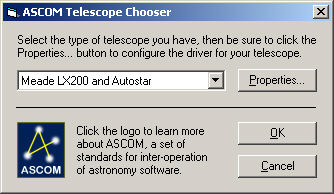
Open the ASCOM Dome Control Panel, as described under Dome Setup. Click the Setup button, and click Select Scope.
Select the desired telescope, and then click Properties... to configure it. When you are done click OK.
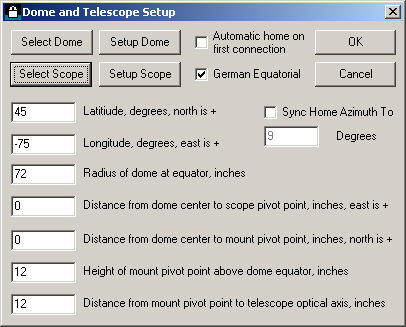
Now you must set up some dome parameters. This only need be done once.
Enter your Latitude, in degrees. North is positive. This should be a decimal number, e.g. 45.5.
Enter your Longitude in degrees. Note that the Western hemisphere is Negative.
Enter the Radius of the dome at its equator, in inches (make sure you enter the radius, which is half the diameter).
We must also enter some parameters for the telescope mount.
Enter the east/west distance from the center of the dome to the telescope pivot point, in inches. The dome center is the geometric center at the equator of the dome (in most cases, the bottom of the hemispherical dome itself). If the mount is east of center, enter a positive number; if the mount is west of center, enter a negative number.
Enter the north/south distance from the center of the dome to the telescope pivot point, in inches. If the mount is north of center, enter a positive number; if the mount is south of center, enter a negative number.
Enter the height of the mount pivot point above the dome center, in inches. For a fork mount, this is the point between the two Declination bearings. For a German equatorial mount, this is the point where the RA axis meets the Declination axis.
Enter the distance from the mount pivot point to the telescope optical axis in inches.
Select German Equatorial if your mount is a GE; otherwise turn it off.
You may want to turn on Automatic home on first connection. This will cause the dome to automatically find its home position when you first connect, which will ensure that the dome positions will be accurate. If your Rotation Controller has battery or UPS power available, you probably do not need to do home the dome except after prolonged power outages.
You can optionally override the Home position setting in the MaxDome II Dome Setup dialog box, by turning on Sync Home Azimuth To and entering an azimuth in degrees.
Getting the mount/dome parameters correct is critical for proper slaving. It can be very difficult to tell which number is wrong if an error is made. If you find the telescope does not reliably align with the dome when Slave to Telescope is checked in the main control panel window, double-check everything, including the following:
Make sure you have the latest update to the ASCOM Dome Control Panel.
Make sure the dome is not rotating backwards. If you click Home it should turn to the right as seen from inside the dome. If it is rotating backwards, reverse the wires to the motor.
Make sure the Tics Per Revolution in the Setup Dome dialog is set correctly.
Note that if the pulses from the encoder come too quickly, that could result in loss of tics; the recommended rate is one transition per second. If the optical sensor does not have the correct spacing, or it moves around during dome rotation, it could produce corrupted tics.
Use the GOTO button to command the dome to slew to 0 degrees, 90 degrees, 180 degrees, and then 270 degrees. Make sure the dome points due North, East, South, and West respectively. If the dome does not move exactly 90 degrees in each step, then your Tics Per Revolution is wrong. If the dome moves an appropriate distance but doesn't point the right way, your Home Azimuth is wrong. If the positioning is inconsistent check the alignment and spacing of the optical sensor.
Make sure you entered the radius of the dome, not the diameter. If you have the radius wrong, the telescope will not point accurately, especially when it is looking through the slit at an angle.
An error in the height of the mount pivot point will have a similar effect as an error in the dome radius. Remember, the pivot point is where the RA and Dec axes intersect.
If you have a systematic offset in a particular part of the sky, check the pier centering.
If the pointing is inaccurate when your telescope is way over to one side or the other of the GE mount, check the distance from the mount pivot point to the optical axis.
Once the telescope is slaved, the dome will follow the telescope, whether it is slewing or sidereal tracking. The telescope position is read periodically (every 10 seconds for ASCOM Dome Control Panel), so the dome may move in increments if you move the telescope using the hand paddle, or if you are using control software that does not connect through the control panel.
To configure a telescope control program for dome operations, set it to connect to the ASCOM Dome Control Panel, instead of directly to the telescope. Now when a command is sent from the software to the telescope, the Control Panel will intercept the command before it is passed to the telescope. It will simultaneously command the dome to turn to the correction position. It will also report back that the telescope is slewing while either the dome or telescope are still moving. That way, if the dome takes longer to slew than the telescope, you will not get a photo of the inside of the dome!
Please see Normal Operation for instructions on using dome slaving.